Most marketing teams don't build or operate their content strategy in a single place, at a single time. A strategy doc could get drafted inside a Claude chat, but a competitive teardown might happen in a Cursor project. Long term planning often happens over many lines of chat in Slack.
Unfortunately, the numbers and real-time performance that should anchor all of it live in a dashboard on the other side of a login, and the workflow turns into copying, pasting, screenshotting and (shudder) retyping numbers by hand.
At GrowthX, we think the data should always be at your fingertips. That's why every GrowthX platform workspace can now connect to Claude, ChatGPT, Claude Code, Cursor, or any other MCP-capable client. This lets the agent you already work with get live access to all of the data in those spaces, like pages, briefs, rich context, and analytics.
Working without that context is working harder and slower than your competitors. Here's a few ways that connecting to the GrowthX platform via MCP can lend your team speed and ease.
A workspace you can ask questions of
The GrowthX platform can directly answer the questions its screens were designed for, and we worked hard to make sure it works incredibly hard to provide a really comprehensive look at your content and its performance.
But an agent with MCP access can ask the questions we never anticipated, the ones that only make sense to someone as close to the work as you are.
"Which pricing pages lost position this month, and do they share a persona?"
"Summarize every brief in review against our writing profile."
"Identify opportunities that align with Q4's launch plans."
You ask in plain language, and the agent pulls live workspace data instead of working from whatever you pasted into the chat or forcing you into the 'export' business.
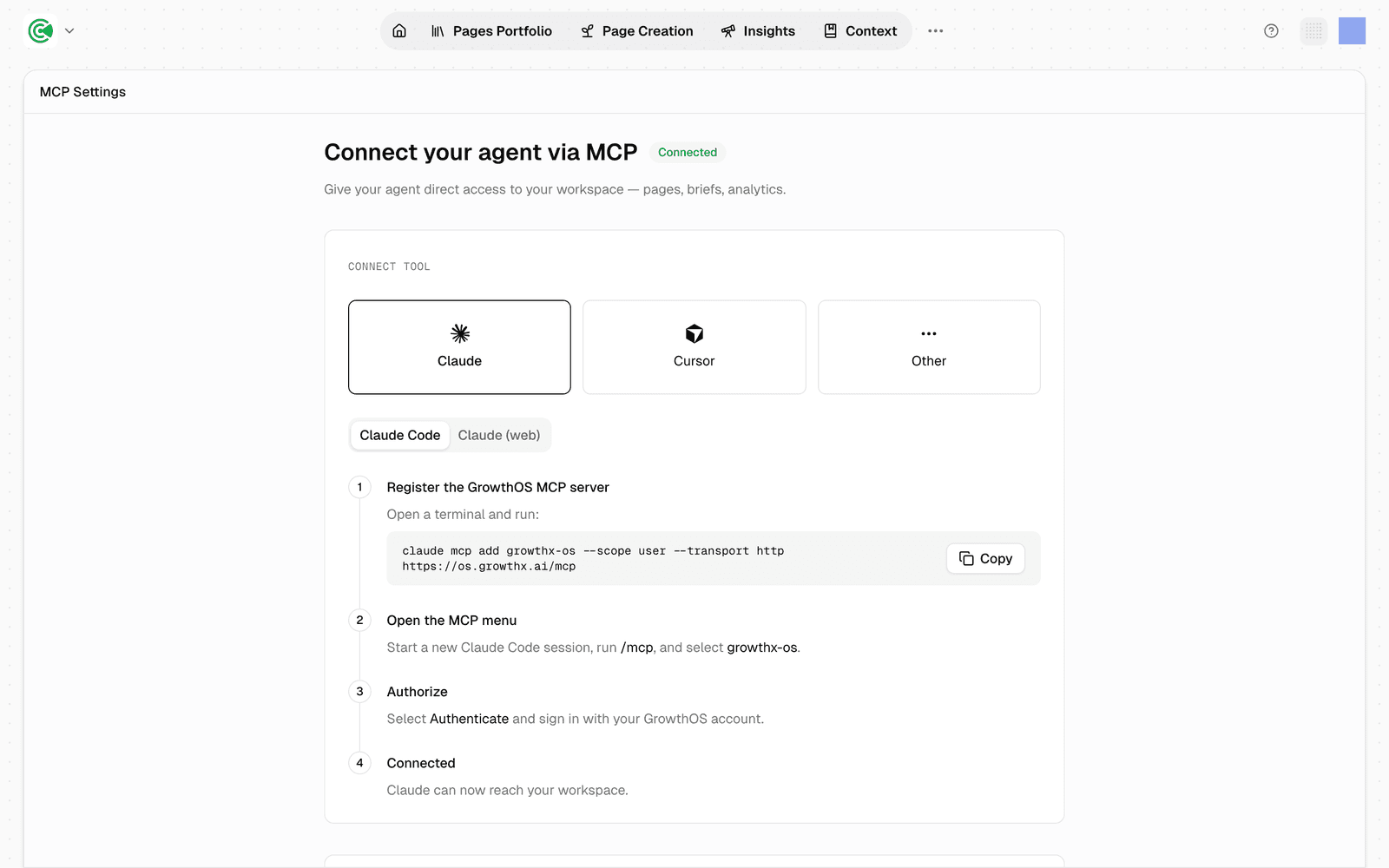
Setup takes about ten minutes and it's per client, so connecting Claude doesn't also connect Cursor. Once you sign in, your agents and tools can read your portfolio and its scores, every brief and the research behind it, your context documents, and your traffic. Access is read-only by default, so nothing your agent does over MCP can change your workspace until you decide it should.
The jobs worth stealing first
If you're looking for inspo, we keep a prompt-by-prompt playbook in the docs to help you get some work off of your plate. A few favorites, in the order teams reach for them:
- Diagnose an underperforming page. The agent reads the page's health and quality audits, its traffic trend, and its keyword rankings, then argues the single biggest bottleneck instead of handing you a dashboard. Any page in your portfolio has an Analyze action that builds this prompt for you.
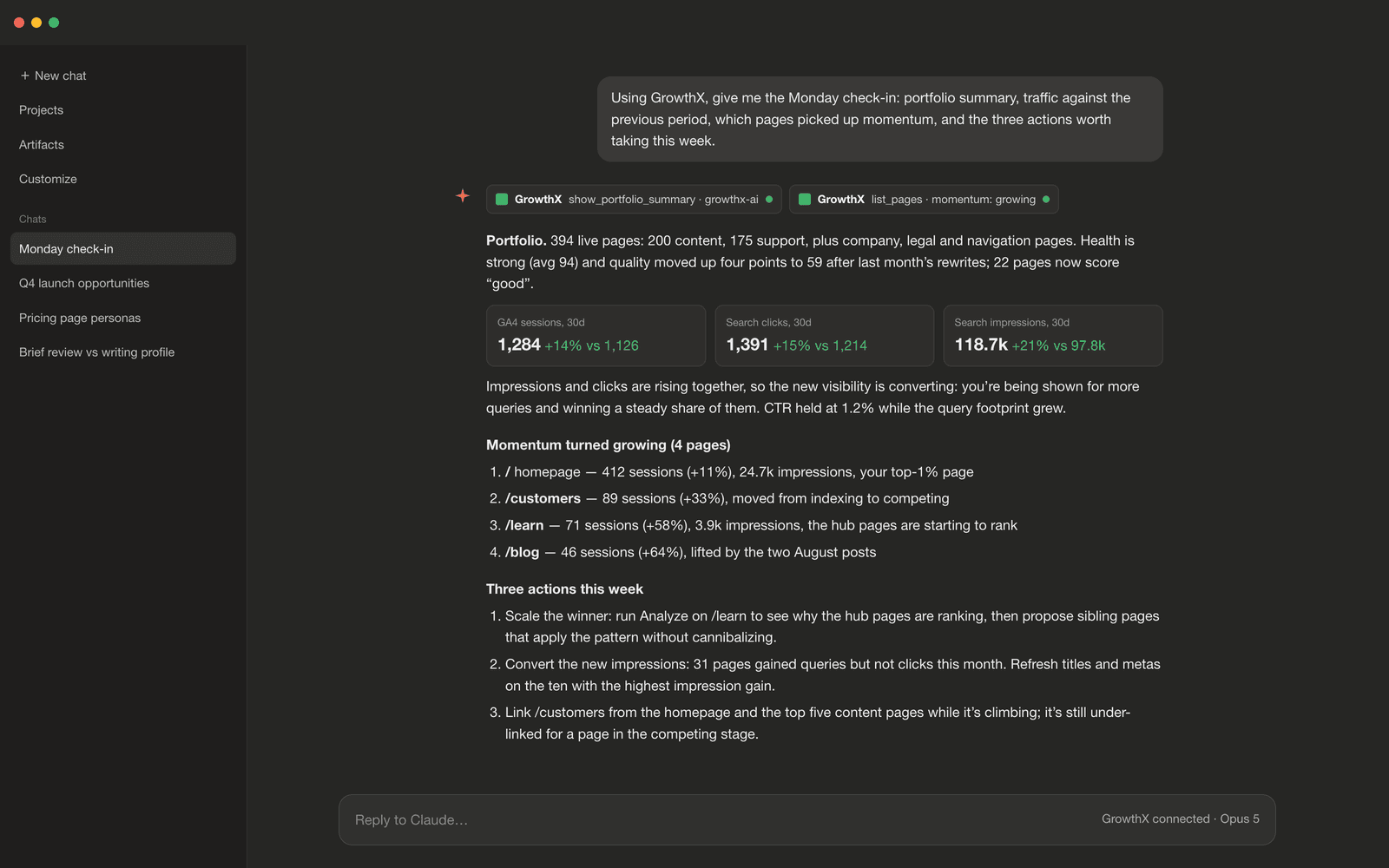
- The Monday check-in. Portfolio summary, traffic by channel against the previous period, any pages whose momentum turned Declining or Freefall, and the actions worth taking this week. Five minutes, and the week starts with a triage list instead of a feeling.
- Scale a winner. Work out why a page wins structurally, propose sibling pages that apply the pattern, and check each one against existing pages so nothing cannibalizes.
- Find internal links. Candidates in both directions plus anchor text. Internal linking is the boring task with the biggest payoff in content, which makes it exactly the kind of work an agent should be doing.
- Claim-check a draft. The research behind every brief is readable over the connection, so verifying a draft's claims against its sources becomes a delegable job rather than a scavenger hunt.
Whatever you ask, ask for a recommendation rather than raw numbers, because the agent finally has the context to back up its decisions and even argue it out with you. Like a good editorial companion should.
And it can do things, too
Read-only mode gets you access to your data, but once you're warmed up you're ready to turn on write mode too. After a few weeks using the MCP most teams we work with find that a deeply contextualized agent's recommendations are the ones they would have made anyway, and the remaining work is clicking through the app to apply them. Write access removes that step. The same agent, in the same conversation, can now take action in your workspace.
Sign in to the connector again and the approval screen offers Include write access, off by default. Tick it for everything, or expand it and pick areas one at a time. Each area is its own permission:
- Personas and competitors. Create, edit, archive, and delete the people and rivals in your brand context.
- Brand context. Rewrite the foundation documents (Company Overview, Product Features, Ecosystem Map, ICP) and your writing voice guidance.
- Taxonomy, clusters, and groupings. Reorganize how content is categorized, clustered, and sliced.
- Page briefs. Create, edit, and annotate briefs and their articles, and work the review loop.
- Opportunities. Accept, dismiss, and seed page opportunities.
- Agent runs. Start and cancel the platform's own agents: outlines, articles, research, audits.
- CMS publishing. Push a finished brief through your connected CMS.
So a team that wants the agent managing briefs but nowhere near the brand documents grants Page briefs and Opportunities, and nothing else. Every write previews first and applies only when you confirm it, whichever areas you've opened up.
What that looks like on the daily
With write access on, the loop closes inside the conversation you were already having.
After a positioning call, hand the agent the transcript.
"Update our personas and competitors to match what we decided, and draft an edit to the Company Overview. Show me each change before you apply it."
The persona that was retired on the call gets archived, the two competitors that came up get added with the framing you actually used, and the overview edit arrives as a preview you approve or reject.
When you build briefs in your own workflow you can ask it to "create a brief for a comparison page on us versus Acme aimed at our buyer persona, generate the outline, and stop there."
The brief exists in the platform, the outline follows your Claude project's own instructions, and the article run waits for you.
Or, maybe you're just doing your weekly content planning.
"Walk me through my open page opportunities one by one with your recommendation. When I say accept or dismiss, apply it."
Because the agent is drafting into the platform rather than into a chat window, every annotation it leaves on a brief feeds the same review loop your editors use, and every article it kicks off runs against your writing profile. The platform gets smarter over time, your context gets richer and you get to work the way you want.
We built this for the way growth teams actually work now. If your content operation already lives in an agent, your growth data should live there too, and so should the ability to act on it. Book a demo and we'll show you how MCP access can make your content agents more powerful.