Site Sync
Sitemaps and the crawler: how GrowthOS learns which pages exist and keeps that picture current.
App route: /admin/site_sync
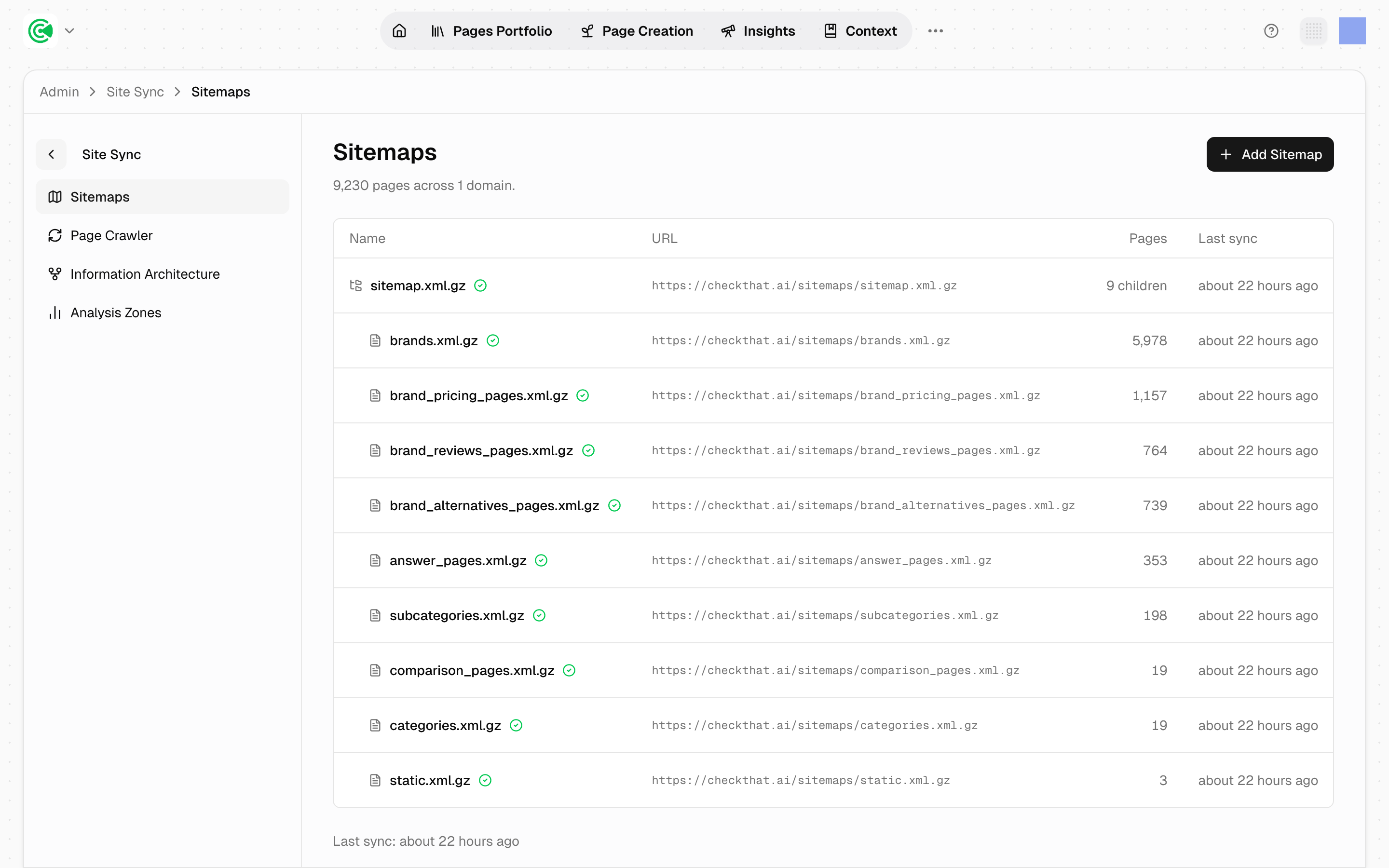
Site Sync is how GrowthOS learns what pages exist on your site and keeps that picture current. Your sitemaps define the set of pages; the crawler visits them and records what it finds. Everything in the Pages Portfolio, the list of every page on your site, starts here: a page that Site Sync can't see does not exist as far as the rest of the product is concerned.
GrowthX registers the sitemaps, sets the sync cadence, and maintains this screen. Your job here is to read it and check it, and there is one check that's genuinely yours: whether the page count matches what you believe your site contains.
Doing this rather than looking it up? The Tutorial covers your side of it, the count check, in 2.1 · Connect your data.
Reference
Site Sync has 4 areas in its sub-navigation: Sitemaps, Page Crawler, Information Architecture, and Analysis Zones.
The Sitemaps table lists each sitemap with:
| Column | What it holds |
|---|---|
| Name | The sitemap filename |
| URL | Where it's fetched from |
| Pages | Pages found, or N children for an index sitemap |
| Last sync | When it was last read |
The header gives the totals (pages across domains), and a single Last sync timestamp for the whole set sits at the bottom.
Compressed sitemaps (.xml.gz) are supported, and the crawler reads index sitemaps recursively.
What the crawler checks
The crawl feeds a page's Health score: a technical audit of 77 checks grouped into 13 categories. (The crawl and the audit are separate steps: the crawler fetches pages, and a health audit scores them.)
| Category | Examples of what it checks |
|---|---|
crawlability | indexability, canonical chains, redirect chains, sitemap coverage, robots.txt |
core_seo | title, meta description, H1, canonical, charset, Open Graph, Twitter cards |
content | word count, heading hierarchy, freshness, duplicate descriptions, author info |
links | broken internal and external links, dead ends, HTTPS downgrades |
performance | TTFB, compression, cache headers, CSS/JS weight, render-blocking resources |
schema | Article, FAQ, Breadcrumb, Organization, Product, Review, JSON-LD validity |
url_structure | length, hyphens, case, parameters, stop words, trailing slash |
images | alt text, broken images, file size |
security | HTTPS, mixed content |
social | OG image, og:url matching canonical, social profile tags |
i18n | lang attribute, hreflang |
local_seo | NAP consistency via LocalBusiness or Organization schema |
analytics | Tracking and consent: tag-manager presence, consent-mode integration |
Every check returns pass, warn or fail with a human-readable message and the underlying values: a failing TTFB check names the measured value and the limit, a title-length warning names the count and the recommended range. Each category gets its own score, and the page's overall Health is derived from them, so a page can sit at 89 overall while carrying a category at 50.
Read the individual checks on Page detail rather than here: this screen defines the crawl's scope, it doesn't display results.
Your sitemap decides your portfolio. This is the single most consequential fact about Site Sync. If a section of the site is missing from the sitemap, it's missing from the Portfolio, missing from scoring, and missing from every report: silently. There's no error state for "pages you never told us about." Comparing the page total against what your own CMS says is the one check that catches it, and it's yours to run.
Sync frequency is a data-freshness lever, not a performance one. A sitemap synced daily reflects new pages within a day; on a fast-publishing site, a weekly sync means the Portfolio lags reality by up to a week. GrowthX sets the cadence, so if your publishing pace has outgrown it, raise it with your strategist, your GrowthX contact.
Segmented sitemaps are worth the effort. Splitting by section (one sitemap per content type rather than a single monolith) makes the page counts on this screen diagnostic. When a count drops, you know which part of the site changed. Your site generates the sitemaps, so this split is yours to make; GrowthOS picks the pieces up from the index automatically.