Pages Portfolio
Every URL on your site as one scored inventory, with the filters and groupings to read it.
App route: /pages
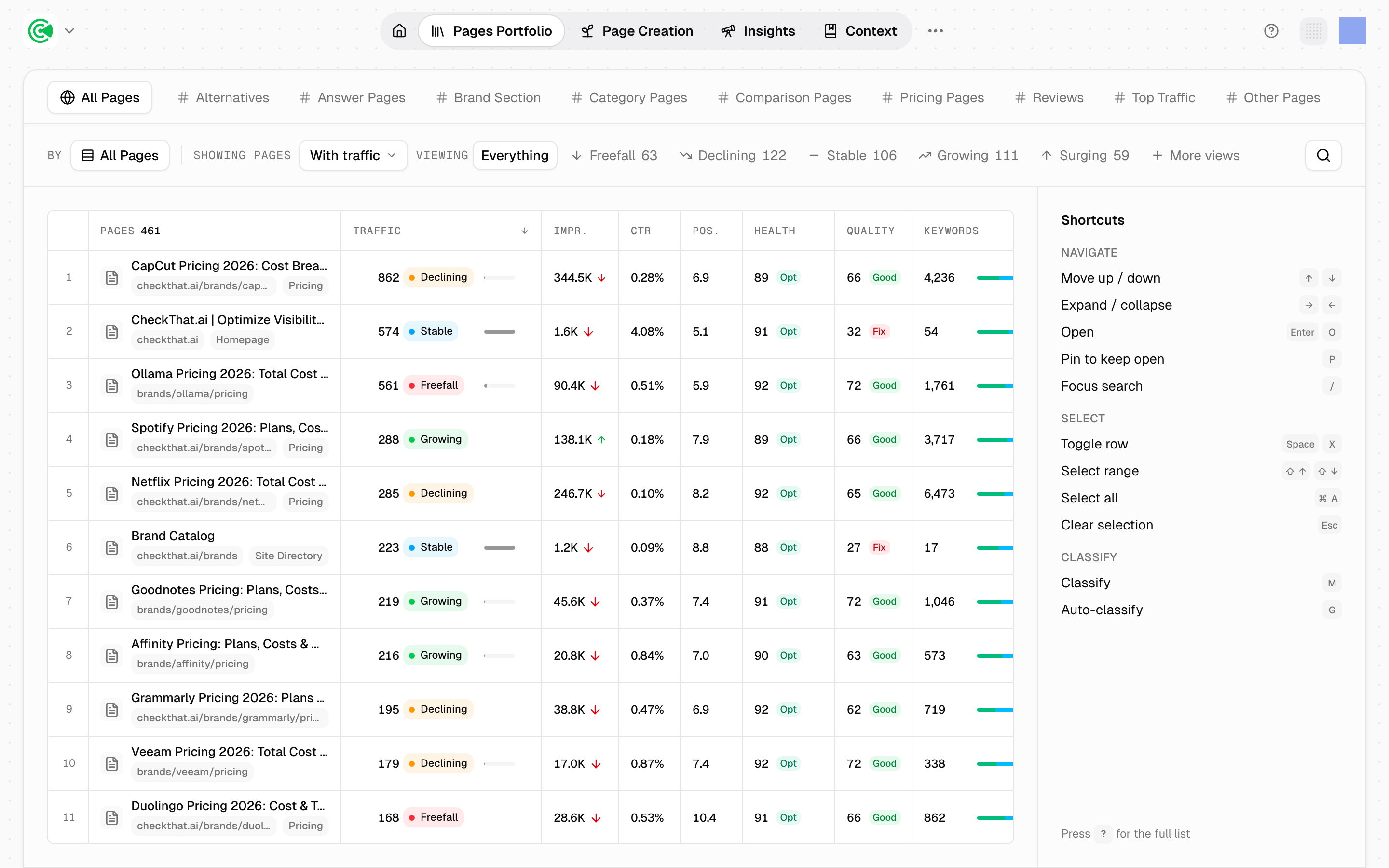
The Pages Portfolio is every URL on your site as one inventory, each page scored and classified. It's the screen for deciding where the week goes: sort, filter and group until a wall of URLs becomes a short list of decisions.
Analysis zones, the parts of your site GrowthOS crawls and analyzes, become the tabs across the top, so the way the site is divided in Analysis Zones is the way you navigate it here. GrowthX builds the zones, so when the tabs don't match how you think about the site, raise it with your strategist, your GrowthX contact, rather than looking for a setting.
Doing this rather than looking it up? The Tutorial walks this screen step by step in 4 · Find.
Reference
The table columns:
| Column | What it shows |
|---|---|
| Pages | Title and URL |
| Traffic | Sessions, with a trend |
| Impr. | Impressions |
| CTR | Click-through rate |
| Pos. | Average position |
| Health | Technical score, 0–100 |
| Coverage | How well the page answers its target question, rolling out workspace by workspace |
| Keywords | Keywords the page ranks for |
| Capture | How much of its potential traffic the page earns |
| Published | When the page was published, sortable |
| Updated | When the page was last updated, sortable |
There's no Big Picture column here: that lives on Page detail. The portfolio-level equivalent is Capture.
The default filter hides your quietest pages
The portfolio opens filtered. Pages under 10 visits are hidden by default, so the count you see on arrival is smaller than the number of pages on your site. This is the single most common reason a page looks missing.
Before concluding a page was never crawled (read from your sitemap into GrowthOS's copy of your pages), clear the filter. If it appears, it was always there and sat below the threshold. If it still does not, the cause is upstream in Site Sync, the connection that keeps GrowthOS's copy of your site current, not here.
"No traffic" is a filter value, not a band. Pages with no traffic at all are counted separately from Freefall through Surging, because they are a different condition rather than a worse one.
Page type is a fixed classification: 12 types, each with finer subtypes, covering content, product, pricing, homepage and the rest.
Fingerprint is 6 independent axes, and it's the most useful read on the screen:
| Axis | Values |
|---|---|
| Lifecycle | Pre-index · Indexing · Competing · Plateaued · Declining · Dormant |
| Momentum | Surging · Growing · Stable · Declining · Freefall |
| Traffic | Hero · Workhorse · Contributor · Long-tail · Low traffic |
| Readiness | Clean · Minor debt · Meaningful debt · Broken |
| Competition | Open · Soft · Contested · Locked · Zero-click |
| Query health | Head winning · Head visible · Head losing · Tail winning · Off target · No footprint |