How your analysis zones work
Zones become the tabs you navigate the Portfolio by, and they schedule which parts of your site get deep analysis. GrowthX builds them; you decide how the site divides.
App route: /admin/site_sync/analysis_zones
Zone scope drives analysis cost. Every page a zone matches gets deep analysis at the zone's frequency, so scope and frequency together decide how much analysis runs. That is why zones are set deliberately rather than defaulting to the whole site, and why a scope change is worth a conversation with your GrowthX team rather than a quick request.
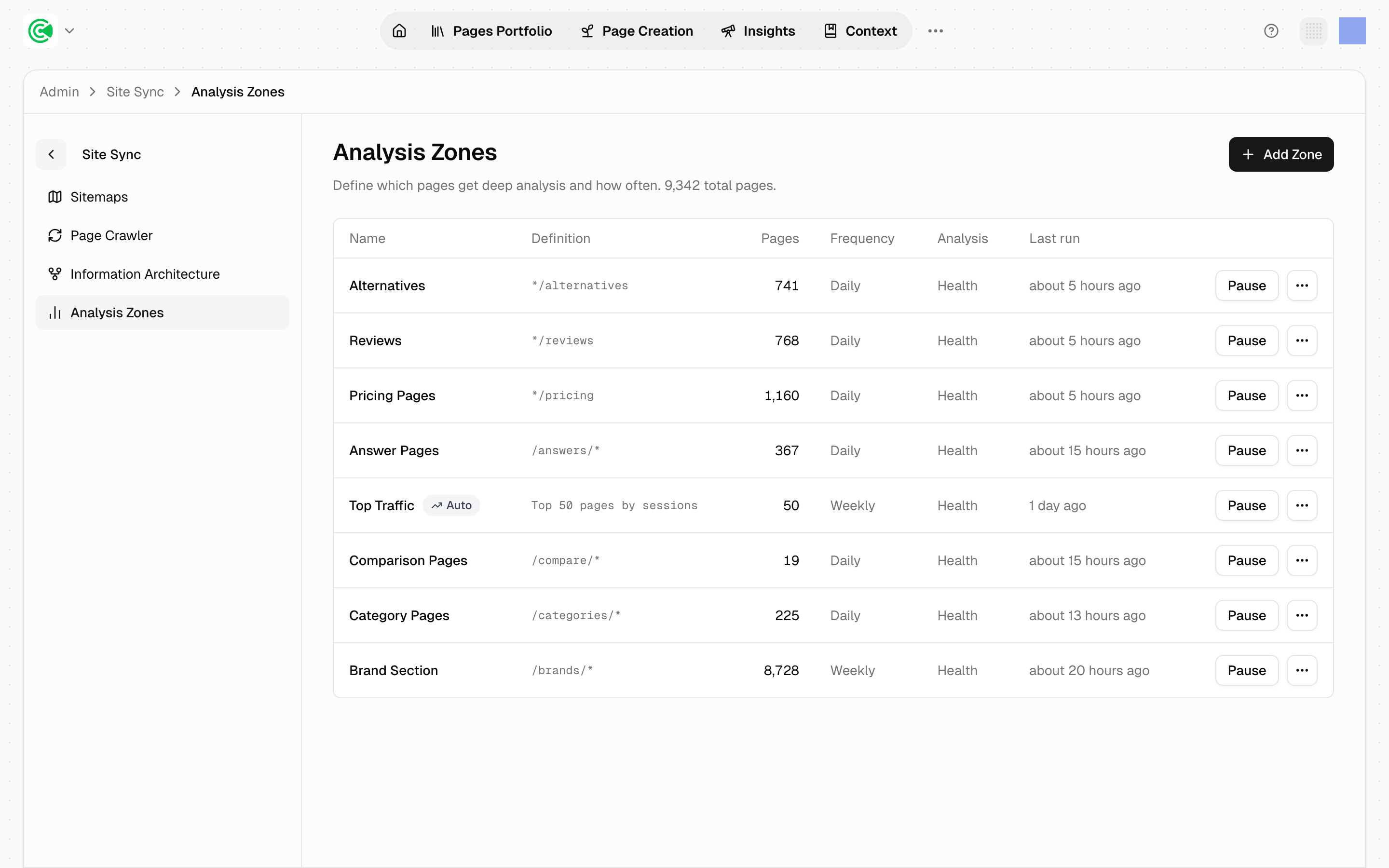
Zones become the tabs across the top of the Pages Portfolio, the list of every page on your site, so the way the site is divided here is the way you navigate it every day. That's the reason to read this screen even though GrowthX maintains it.
Their other job is scheduling: zones decide which parts of your site get deep analysis and how often. GrowthX creates the zones, sets their frequency, and runs them. Your input is the judgement call underneath: how you want to read your site. When the tabs don't match how you think about it, tell your GrowthX team what the 4 or 5 groupings should be.
Doing this rather than looking it up? The Tutorial covers your side of the decision in 2.2 · Choose your zones.
Reference
| Column | What it holds |
|---|---|
| Name | What the zone is called: the label that appears as a Portfolio tab. Rule-based zones carry an Auto badge here |
| Definition | The URL pattern, the rule text (Top 50 pages by sessions), or Manually selected pages |
| Pages | How many pages currently match |
| Frequency | Daily, Weekly or Monthly, with (N sampled) appended when the zone is sampled rather than run whole |
| Analysis | What analysis runs: see the caveat below |
| Last run | When it last completed |
The header shows total pages in the workspace, which is the number to read your zone page-counts against.
Frequency is elapsed time, not a calendar. Weekly means "at least 7 days since this zone last ran", not "every Monday". So a zone whose last run is 6 days old on a weekly cadence isn't late, and a fresh result may land any time after the period elapses.
Zones can overlap, and a page can match more than one.
A zone's scope change changes what gets analyzed and how much. Widening a zone or raising its frequency increases the analysis run every cycle. GrowthX makes these changes; when you ask for one, say what you want the tabs to show, and let your team set the scope and frequency to match.
Auto rules keep working as the site changes. A Top 50 by sessions zone always covers your most valuable pages, including ones that didn't exist when it was created. Pattern zones only cover what the pattern matches, which is exactly right for structural sections and wrong for "the important stuff."
What "Analysis" actually runs
Every zone runs 3 analyses (health, the technical audit; keywords; and search intent), and quality scoring cascades off the intent leg. There is no per-zone toggle in the UI; the column is informational.
Known issue
The Analysis column reads Health on every row today. That is a display
bug, not the behaviour: the column checks for an analysis key named serp that
was renamed to keywords on the backend, so the keywords and intent legs never
render. All 3 analyses do run. A fix is tracked; read the column as
under-reporting until it lands.