Competitors
The competitor roster that shapes reports, gap analysis and how opportunities get framed.
App route: /brand_context/competitors
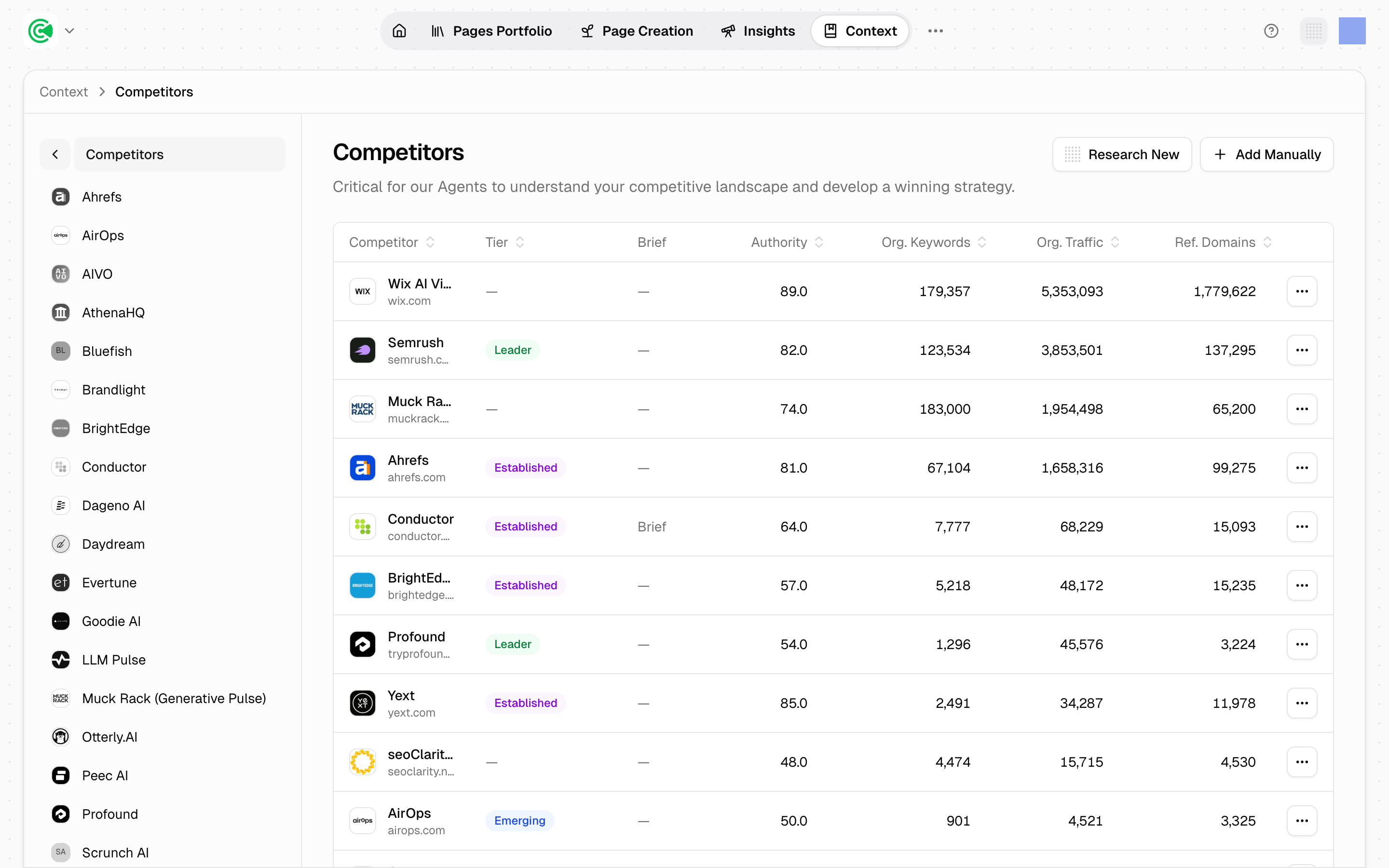
Competitors is the roster your market is measured against. Every content gap, every competitive comparison, and every position your pages stake out is calculated relative to this list: so a list that matches your real market produces gaps that matter, and a list that doesn't produces noise.
The initial set comes from research agents (the automated workers that research, draft and score) during setup: the rivals you named in your materials, plus the ones research surfaced on its own. It usually needs a pass, because research finds who ranks near you rather than who you actually lose deals to.
Doing this rather than looking it up? The Tutorial walks this screen step by step in 3.2 · Calibrate your competitors.
Reference
| Column | What it holds |
|---|---|
| Competitor | Name and domain |
| Tier | leader, established, emerging, niche, or unset: assigned by agents, not editable |
| Brief | Whether a competitor brief has been generated |
| Authority | Domain authority score |
| Org. Keywords | Organic keywords the domain ranks for |
| Org. Traffic | Estimated organic traffic |
| Ref. Domains | Referring domains |
Each record also carries an enriched flag: whether SEO and traffic data has been pulled for it. An un-enriched competitor still counts everywhere; it shows dashes in the metric columns.
The 4 metric columns are all market-wide, not relative to you. A competitor can carry enormous organic traffic and still be irrelevant to your buyers: large horizontal tools frequently top this table while competing with you on almost nothing.
Adding a competitor
Add the rivals your sales calls surface that research missed. The competitive story from your sales calls is the highest-value input here. It's usually sharper than anything published on your website, and it's precisely what research cannot find.
A competitor added without triggering start research keeps an empty brief. Adding the record puts it in every calculation, but its brief stays empty until you click start research. Add the competitor and start the research in the same sitting.
What tier does, and doesn't
Tier is descriptive, not operational. Nothing inside the product filters, weights, ranks or scores on it: not opportunity generation, not gap analysis, not report gating. It's a badge, a sort key on this table, and a piece of context passed to the writing and research agents.
3 consequences worth knowing:
- An unset tier costs you nothing. Null-tier competitors are included in every calculation exactly like the rest. They sort to the bottom of the table, and show either a
Manualbadge if you added them by hand or a dash if research did. - Automatic competitor briefing picks by organic traffic, not tier. The top competitors by traffic get auto-briefed, so a
leaderwith modest traffic won't be prioritized by tiering it. - The Competitive Landscape report uses a different tier entirely. That report classifies threats as Direct, Indirect or Marginal, worked out from the ecosystem map. It never reads this field, and the 2 vocabularies don't line up. Same word, unrelated meaning.
So tier is best treated as a note to your team about who matters, not as a control. If you want a competitor weighted more heavily, the lever is the roster and the enrichment behind it, not the label.