Foundation
The 4 context documents every agent reads first: company, ecosystem, product and ideal customer, and how to correct them.
App route: /brand_context/foundation
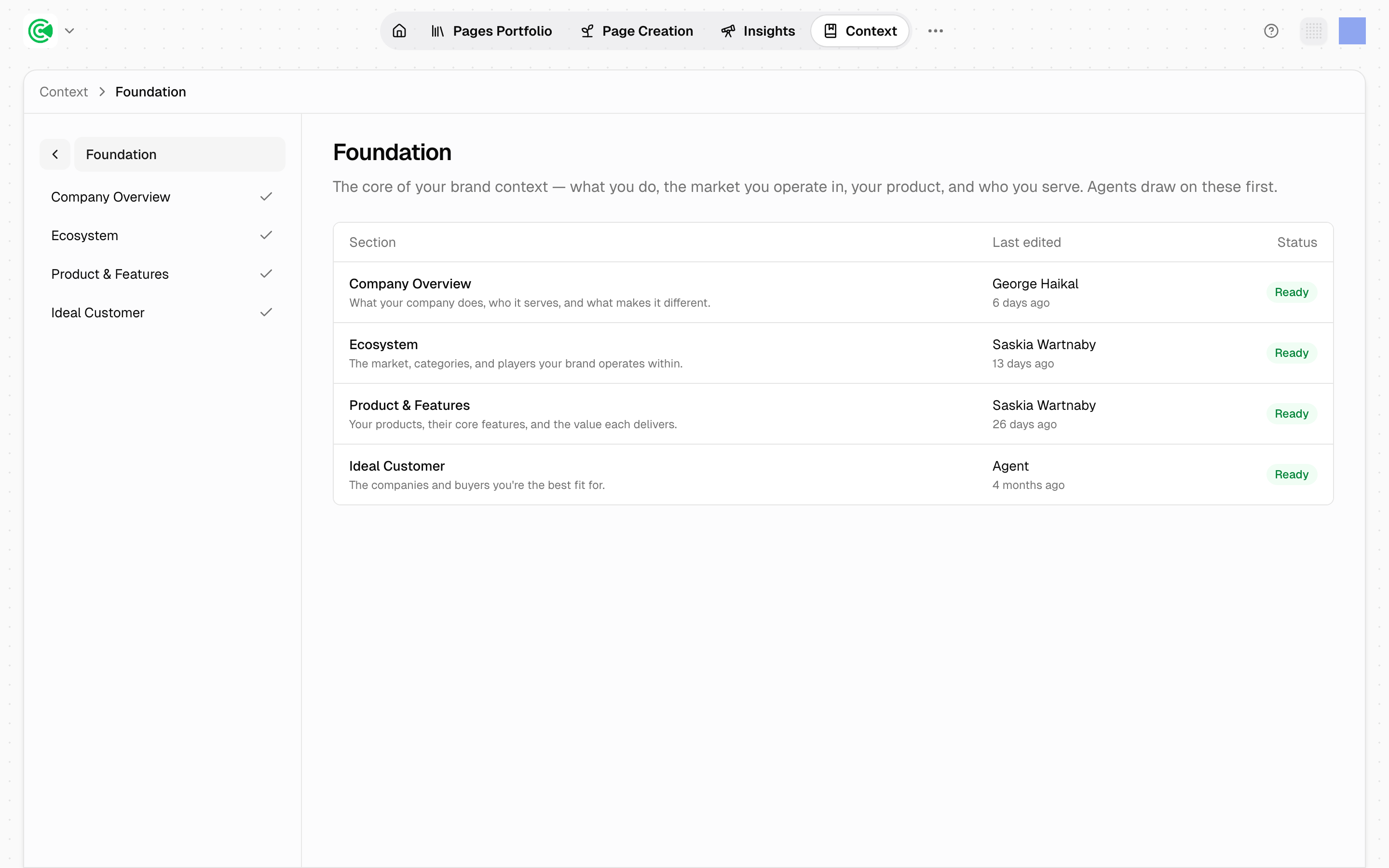
Foundation is the base layer of your context: what your company does, the market it sits in, what you sell, and who you sell it to.
It holds 4 documents, and every agent reads all 4 before it researches a topic, scores a page or drafts a sentence.
All 4 are already drafted, so your job here is to correct them. A wrong sentence in one of these becomes a wrong claim in every draft that follows.
Doing this rather than looking it up? The Tutorial walks this screen step by step in 3.1 · Review your context.
The 4 documents
| Document | What it holds |
|---|---|
| Company Overview | What your company does, who it serves, and what makes it different |
| Ecosystem | The market, categories and players your brand operates within |
| Product & Features | Your products, their core features, and the value each delivers |
| Ideal Customer | The companies and buyers you are the best fit for |
Check Ideal Customer most carefully. Research has the least to go on here, because who you actually win is not something a website says. That knowledge sits in your sales calls. Be specific: if the description would fit your closest competitor equally well, it is still too general.
Start with the Last edited column
It is the fastest read on the screen. Last edited shows a name once a person has edited the document, which may be someone on your team or your GrowthX strategist. It reads Agent while the text is still exactly as it was first drafted.
Anything still showing Agent has never been read by a person, and it is already shaping every draft. That column is your to-do list.
What Status tells you
| Status | What it means |
|---|---|
| Ready | The document has text in it |
| Empty | The document has no text in it |
That is the whole test, and GrowthOS sets it. Ready tells you the document has been written, not that anyone has read it. Last edited is the column that tells you that.
If you find one Empty, tell your strategist. Most of the work that follows will not start until it has text.
Correct a document
Read each one the way you would read a new hire's summary of your company after their first week: mostly right, and wrong in ways only you can catch. What you are looking for is the confident claim that is out of date, such as positioning you have moved on from or a market you have left.
- Click the document name to open it. It opens in a full editor.
- Type over what is wrong. Edits save automatically as you type, and Last edited changes from
Agentto your name.
You have done enough when a skeptical colleague could read all 4 and not wince.
Done Editing is navigation only: it returns you to the document list and plays no part in saving.
Before a large rework, click History and save a named version first. Restoring is one click, and restoring is itself undoable. Autosaves between named versions are pruned over time, so a named version is the durable checkpoint.
One person edits a document at a time. If someone else has it open, you see their name and a Take over button. That person may be your GrowthX strategist rather than someone on your team.
Selecting text gives you an AI option in the floating toolbar, for changes to style and structure. It has no research access, so it cannot add facts, statistics or sources. Those stay yours. 3.3 · Editing and versioning covers the editor in full.
When a document is wrong throughout
Editing is the right fix when a document is mostly right. When one is wrong from top to bottom, it can be regenerated instead, which rewrites it from scratch and takes a note from you to steer the rewrite. Ask your strategist if you want one regenerated.
Regenerating replaces the document rather than editing it. Nothing anyone wrote is merged into the result. Save a named version from History before it runs.
Only one document regenerates at a time, so if another is already running, that one waits. Ecosystem alone takes 20–30 minutes and occasionally an hour, so a document that looks stuck is usually still running. There is no regenerate-all.
Your corrections reach new work only
Agents read these documents at the moment they work, so the next opportunity researched and the next draft written start from your corrected version.
Work already in production keeps the facts it was written with. A brief drafted last week does not heal when you fix the document behind it. If you correct something material, go back through the open briefs that relied on the old version rather than assuming they picked up the change.
Related
The guided read of all 4 documents, including what a confident-but-wrong claim looks like and when you have done enough.
The other 7 screens this one feeds, and the order worth working through them in.
Why this is its own area rather than a settings page.
What an agent does and where it stops.